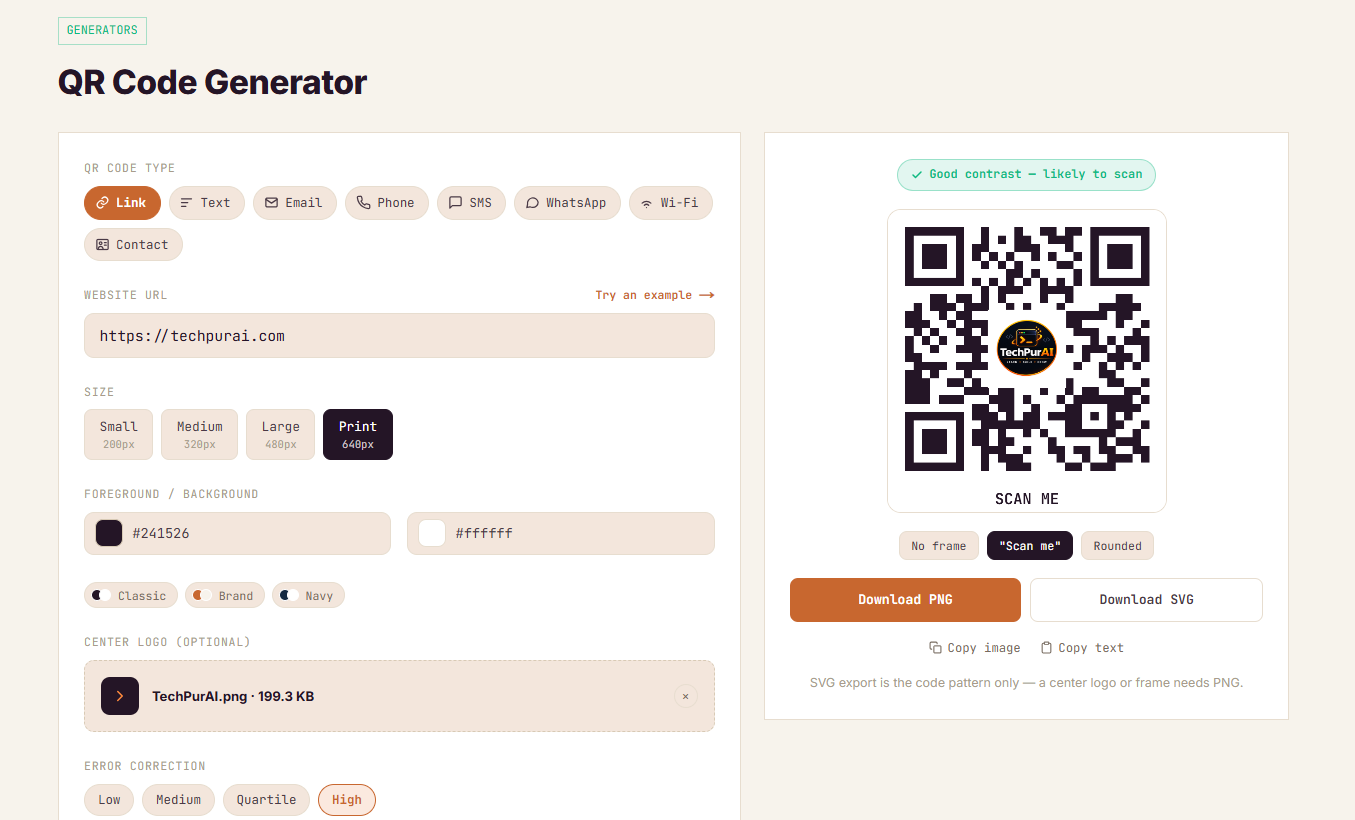
The QR Code Generator used to do one thing: turn typed text into a black-and-white code you could download as a PNG. No color options, no logo, no way to encode a Wi-Fi network or a contact card without hand-typing a formatted string yourself. It worked, but it wasn't competitive with what's actually available for free elsewhere — so before changing any code, I spent an afternoon going through several of the most-used free QR generators to see what "free" actually means on each one.
What most free QR generators actually gate
The pattern was consistent across every tool I looked at: the QR code itself is free, but something you'd reasonably expect to come with it isn't.
- Logo embedding — behind a signup on most, a paid plan on some
- Custom colors — often fine for the preview, then stripped or watermarked on download
- SVG (vector) export — PNG is usually free; a scalable file costs extra
- A watermark-free download — a few only remove their own branding once you're on a paid tier
A couple hide the gate well — you can design the whole code, then hit a signup wall exactly at the download button. That's a reasonable business model. It's also exactly the gap I wanted this tool to not have.
What's new
The rebuilt generator handles eight payload types through dedicated fields instead of making you hand-format a raw string:
- Link and Text — the basics
- Email, Phone, SMS, and WhatsApp — each builds the correct
mailto:,tel:,sms:, orwa.mestring for you - Wi-Fi — network name, password, and encryption type, formatted so a phone offers to join directly
- Contact (vCard) — saves straight to the scanner's contacts app
On top of that:
- Custom foreground and background colors, with a live contrast badge that warns you before you ship a code that won't scan
- A center logo, uploaded locally and composited onto the code, with error correction raised automatically to tolerate it
- PNG and SVG export — SVG scales cleanly for a banner or storefront decal; PNG is what carries the logo, since compositing a raster image into scalable vector output can't be done without quality loss
- "Scan me" and rounded-corner frame presets, baked into the downloaded file itself, not a CSS overlay
All of it runs entirely in your browser. Nothing you type, upload, or generate is sent to a server — a constraint we keep on every tool on this site, not just this one.
What I decided not to do
Every tool I looked at pushes "dynamic" QR codes — a short URL under someone else's control that redirects to your real destination, so you can repoint it later and see scan counts. I left that out on purpose. A dynamic code only works for as long as the company behind it stays in business. If that service shuts down, every code already printed breaks at once, with no way to fix it. A static code — the kind this tool makes — has no such dependency: it keeps working for as long as the destination itself stays valid.
For anything printed in bulk, or meant to last, that's usually worth more than the ability to see scan counts.
Try it
The tool is live now: QR Code Generator. Pick a type, fill in a few fields, and a scannable code appears — free, no account, no watermark on the download.
This is the first tool on the site to get this kind of competitive audit-and-rebuild treatment. The plan is to work through the rest of the catalog the same way.
Frequently asked questions
Is the rebuilt QR generator actually free, or is this a trial?
Free, with no trial period and no account. Every feature in this post — the eight payload types, custom colors, the center logo, PNG and SVG export — works the first time you open the tool and keeps working after. There's no feature that unlocks only after signup.
Why does adding a logo automatically change the error-correction setting?
A center logo covers part of the QR pattern, and error correction is the redundancy that lets a scanner read a code even when part of it is obscured or damaged. High error correction gives up some data capacity in exchange for tolerating that kind of coverage, so the tool raises the setting automatically the moment a logo is added — otherwise the code would likely fail to scan.
Can I still type a raw Wi-Fi or vCard string manually instead of using the form fields?
The dedicated fields are there to prevent a formatting mistake in a string like WIFI:T:WPA;S:...;P:...;; from silently producing a code that doesn't work, so that's the intended path now. The Text option still accepts anything you type as plain text if you have a specific raw format you want to encode yourself.
Will dynamic QR codes with scan tracking be added later?
Not currently planned. A dynamic code depends on the service that issues the short redirect URL staying online indefinitely — if it shuts down, every code already printed with it breaks at once. A static code, the kind this tool makes, keeps working for as long as the destination itself is valid, which matters more than scan analytics for most of the use cases we're building for.